Partielo | Créer ta fiche de révision en ligne rapidement

Cyber Security

What is Cyber Security?

Cyber Security consists of the processes, practices and technologies designed to protect networks, computers, programs and data from attack, damage or unauthorised access.


There are a number of different ways threats can happen including:

  • social engineering techniques
  • malicious code (malware)
  • pharming
  • weak and default passwords
  • misconfigured access rights
  • removable media
  • unpatched and/or outdated software
Social Engineering

It is the manipulation of people into handing over confidential information such as a PIN, password, bank details or money.

Definitions

Blagging (pretexting)
When someone makes up a story to gain a person’s interest and uses this to encourage them to give away information about themselves, or even send money. For example, a person may receive an email that appears to be from a friend telling them that they’re in trouble and asking them to send money.
Phishing
Similar to blagging, where attackers impersonate legitimate organisations to deceive individuals into providing sensitive information. Phishing emails, SMS etc will ask a person to send personal details, but pretends to be from a business. They can often look convincing, but may contain spelling errors, grammar issues, sense of urgency or URLs that do not match the business's website.
Shouldering (shoulder surfing)
Shouldering is looking at someone’s information over their shoulder, for example looking at someone enter their PIN in a shop or at a cashpoint.
Malicious Code

What is malicious code (malware)?

Malicious code is software written to harm or cause issues with a computer. This is also referred to as malware and comes in a number of different forms. In all its forms, the code has been written to either harm or steal data from your computer system.

Examples below -

Definitions

Malware
Malware is an umbrella term used to refer to a variety of forms of hostile or intrusive software
Virus
A virus is a piece of malware that infects a computer, and then replicates itself to be passed onto another computer.
Trojan
A Trojan appears to be a piece of harmless software, often given away for free, that contains malicious code hidden inside. This only appears once the gifted software is installed.
Ransomware
Ransomware hijacks the data on a computer system by encrypting it and demanding that the owners pay money for it to be decrypted.
Spyware
Spyware is a type of malware that collects the activity on a computer system and sends the data it collects to another person without the owner being aware. If a computer has been infected by spyware, it could be sending back everything that is typed, or the sites that are visited, or even where the user is clicking on their screen. Spyware that records what is being typed is known as a keylogger. Keyloggers attempt to find out usernames and passwords by collecting everything that is entered into the system, which allows the hacker to search for personal data.
Adware
Adware is software that either causes pop-ups or windows that will not close. Generally, the pop-ups or windows display advertisements.
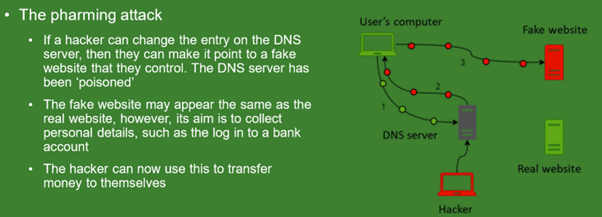
Pharming

What is pharming?


Keywords - DNS, IP Address, poison

Further Threats

Weak and Default Passwords -

Weak Passwords: Those which do not have the required length or do not comprise random characters.

Default Passwords: The security credentials that are supplied by the initial provider of the service.


Misconfigured Access Rights -

The security credentials that are supplied by the initial provider of the service. Access rights set up what can and cannot be seen when someone logs into a system. If these are not set up correctly in an email server, a person may be able to see someone else’s emails. If a person accesses an account that they do not have permission to see, they might be breaking the law.


Removable Media -

Removable media refers to storage devices that can be removed from the computer system. If removable media contain malware, it will attempt to move onto a system when connected to a computer, and then onto any other connected devices. If a computer is connected to others on a network, this could mean that the virus reaches hundreds of machines.


Unpatched or Outdated Software -

Patching is the process of updating software to fix a problem or add a new feature.

Many programs will automatically update to make sure they have the latest patches installed. This helps to ensure the program runs correctly and protects the computer from new threats which are created daily. Most anti-virus software will frequently update itself so that it is able to recognise the latest computer viruses and malware.


Methods to detect and prevent cyber security threats

Factors of Authentication -

The security methods used to access computer accounts. These are ways to prove that people are who they say they are. These factors can be divided into three sections:

  • something a person is - fingerprint or other biometric detail
  • something a person knows - passwords, PINs, secret answers
  • something a person has - a phone, a smart card

Definitions

Biometrics
Biometric security makes use of unique physical characteristics and features to identify people when they are using a computer system. This form of security could be a scan of a fingerprint using the sensor built into a button on a mobile phone, or facial recognition to unlock a mobile device.
Passwords
Keeping passwords safe is important, especially when the password allows access to sensitive or valuable information. Some password systems help to keep passwords safe by only asking for certain characters of a password instead of the whole thing. This helps to prevent spyware like keyloggers from stealing passwords.
CAPTCHA
CAPTCHA forms challenge humans to prove that they are indeed human.
Email confirmations
When a person signs up for a new account, they often receive an email asking them to confirm that they asked for the account to be created by clicking a specific link. This security feature alerts them that their email is being used to create an account and acts as a way for them to prove their identity to the company they are creating the account with.
Automatic software updates
By regularly updating the software on a computer, users are as protected as they can possibly be. Setting automatic updates means a computer system will attempt to install patches or fixes as soon as they are available by searching for them on a regular basis. If this task was left to users, it would be easier for them to forget or ignore the updates.
Penetration Testing

The process of attempting to gain access to resources without knowledge of usernames, passwords and other normal means of access.


Malicious Insider -

When the person or team testing the system has knowledge of and possibly basic credentials for the target system, simulating an attack from inside the system.

  • They will have permission to try and find weaknesses in the computer systems
  • They may have basic credentials such as a username and password for the target system
  • They will be given network and system information to help target possible attacks


External Attack -

When the person or team testing the system has no knowledge of any credentials for the target system, simulating an attack from outside the system.

  • The company or engineer trying to find weaknesses in the system has no inside knowledge of the target system such as passwords or layout of the network structure
  • This simulates the damage that someone with no inside knowledge could do

You may see Malicious Insider referred to as White Box Testing and External attack as Black Box Testing


Cyber Security

What is Cyber Security?

Cyber Security consists of the processes, practices and technologies designed to protect networks, computers, programs and data from attack, damage or unauthorised access.


There are a number of different ways threats can happen including:

  • social engineering techniques
  • malicious code (malware)
  • pharming
  • weak and default passwords
  • misconfigured access rights
  • removable media
  • unpatched and/or outdated software
Social Engineering

It is the manipulation of people into handing over confidential information such as a PIN, password, bank details or money.

Definitions

Blagging (pretexting)
When someone makes up a story to gain a person’s interest and uses this to encourage them to give away information about themselves, or even send money. For example, a person may receive an email that appears to be from a friend telling them that they’re in trouble and asking them to send money.
Phishing
Similar to blagging, where attackers impersonate legitimate organisations to deceive individuals into providing sensitive information. Phishing emails, SMS etc will ask a person to send personal details, but pretends to be from a business. They can often look convincing, but may contain spelling errors, grammar issues, sense of urgency or URLs that do not match the business's website.
Shouldering (shoulder surfing)
Shouldering is looking at someone’s information over their shoulder, for example looking at someone enter their PIN in a shop or at a cashpoint.
Malicious Code

What is malicious code (malware)?

Malicious code is software written to harm or cause issues with a computer. This is also referred to as malware and comes in a number of different forms. In all its forms, the code has been written to either harm or steal data from your computer system.

Examples below -

Definitions

Malware
Malware is an umbrella term used to refer to a variety of forms of hostile or intrusive software
Virus
A virus is a piece of malware that infects a computer, and then replicates itself to be passed onto another computer.
Trojan
A Trojan appears to be a piece of harmless software, often given away for free, that contains malicious code hidden inside. This only appears once the gifted software is installed.
Ransomware
Ransomware hijacks the data on a computer system by encrypting it and demanding that the owners pay money for it to be decrypted.
Spyware
Spyware is a type of malware that collects the activity on a computer system and sends the data it collects to another person without the owner being aware. If a computer has been infected by spyware, it could be sending back everything that is typed, or the sites that are visited, or even where the user is clicking on their screen. Spyware that records what is being typed is known as a keylogger. Keyloggers attempt to find out usernames and passwords by collecting everything that is entered into the system, which allows the hacker to search for personal data.
Adware
Adware is software that either causes pop-ups or windows that will not close. Generally, the pop-ups or windows display advertisements.
Pharming

What is pharming?


Keywords - DNS, IP Address, poison

Further Threats

Weak and Default Passwords -

Weak Passwords: Those which do not have the required length or do not comprise random characters.

Default Passwords: The security credentials that are supplied by the initial provider of the service.


Misconfigured Access Rights -

The security credentials that are supplied by the initial provider of the service. Access rights set up what can and cannot be seen when someone logs into a system. If these are not set up correctly in an email server, a person may be able to see someone else’s emails. If a person accesses an account that they do not have permission to see, they might be breaking the law.


Removable Media -

Removable media refers to storage devices that can be removed from the computer system. If removable media contain malware, it will attempt to move onto a system when connected to a computer, and then onto any other connected devices. If a computer is connected to others on a network, this could mean that the virus reaches hundreds of machines.


Unpatched or Outdated Software -

Patching is the process of updating software to fix a problem or add a new feature.

Many programs will automatically update to make sure they have the latest patches installed. This helps to ensure the program runs correctly and protects the computer from new threats which are created daily. Most anti-virus software will frequently update itself so that it is able to recognise the latest computer viruses and malware.


Methods to detect and prevent cyber security threats

Factors of Authentication -

The security methods used to access computer accounts. These are ways to prove that people are who they say they are. These factors can be divided into three sections:

  • something a person is - fingerprint or other biometric detail
  • something a person knows - passwords, PINs, secret answers
  • something a person has - a phone, a smart card

Definitions

Biometrics
Biometric security makes use of unique physical characteristics and features to identify people when they are using a computer system. This form of security could be a scan of a fingerprint using the sensor built into a button on a mobile phone, or facial recognition to unlock a mobile device.
Passwords
Keeping passwords safe is important, especially when the password allows access to sensitive or valuable information. Some password systems help to keep passwords safe by only asking for certain characters of a password instead of the whole thing. This helps to prevent spyware like keyloggers from stealing passwords.
CAPTCHA
CAPTCHA forms challenge humans to prove that they are indeed human.
Email confirmations
When a person signs up for a new account, they often receive an email asking them to confirm that they asked for the account to be created by clicking a specific link. This security feature alerts them that their email is being used to create an account and acts as a way for them to prove their identity to the company they are creating the account with.
Automatic software updates
By regularly updating the software on a computer, users are as protected as they can possibly be. Setting automatic updates means a computer system will attempt to install patches or fixes as soon as they are available by searching for them on a regular basis. If this task was left to users, it would be easier for them to forget or ignore the updates.
Penetration Testing

The process of attempting to gain access to resources without knowledge of usernames, passwords and other normal means of access.


Malicious Insider -

When the person or team testing the system has knowledge of and possibly basic credentials for the target system, simulating an attack from inside the system.

  • They will have permission to try and find weaknesses in the computer systems
  • They may have basic credentials such as a username and password for the target system
  • They will be given network and system information to help target possible attacks


External Attack -

When the person or team testing the system has no knowledge of any credentials for the target system, simulating an attack from outside the system.

  • The company or engineer trying to find weaknesses in the system has no inside knowledge of the target system such as passwords or layout of the network structure
  • This simulates the damage that someone with no inside knowledge could do

You may see Malicious Insider referred to as White Box Testing and External attack as Black Box Testing