Partielo | Créer ta fiche de révision en ligne rapidement

Chapter 2: Computer Programs and Processing

Définition

What is a Computer Program?
A program is a sequence of instructions that tells a computer what to do to solve a problem. Programs can be used for different types of computations: Mathematical (e.g., calculating the square root of a number) Statistical (e.g., performing regression analysis) Symbolic (e.g., searching and replacing text in a document) Graphical (e.g., playing a video or processing an image). A program consists of input, output, processing, and optional conditional execution or repetition.

Sequences and Sequencing


A program consists of a sequence of instructions that tells the computer exactly what to do.

Sequencing refers to writing instructions in a structured and ordered manner.

Définition

What is a Sequence?
A sequence is a structured set of ordered steps that explicitly solve a problem. It reflects manual processes and business rules related to a specific problem domain. Sequences are not generalizable; they are specific to a task. Later, we can learn to abstract sequences into reusable algorithms.

Writing Code: Input, Output, and Processing


Input and Output

  • Input: Data received by the computer (from users, files, sensors, etc.).
  • Output: Data sent back by the program (displayed on screen, saved to a file, printed, etc.).
  • Inputs and outputs can be stored for later use.

Processing

  • Processing transforms input into output.
  • It includes basic mathematical and statistical operations (addition, subtraction, averages, percentages, etc.).

Writing Output to the Screen

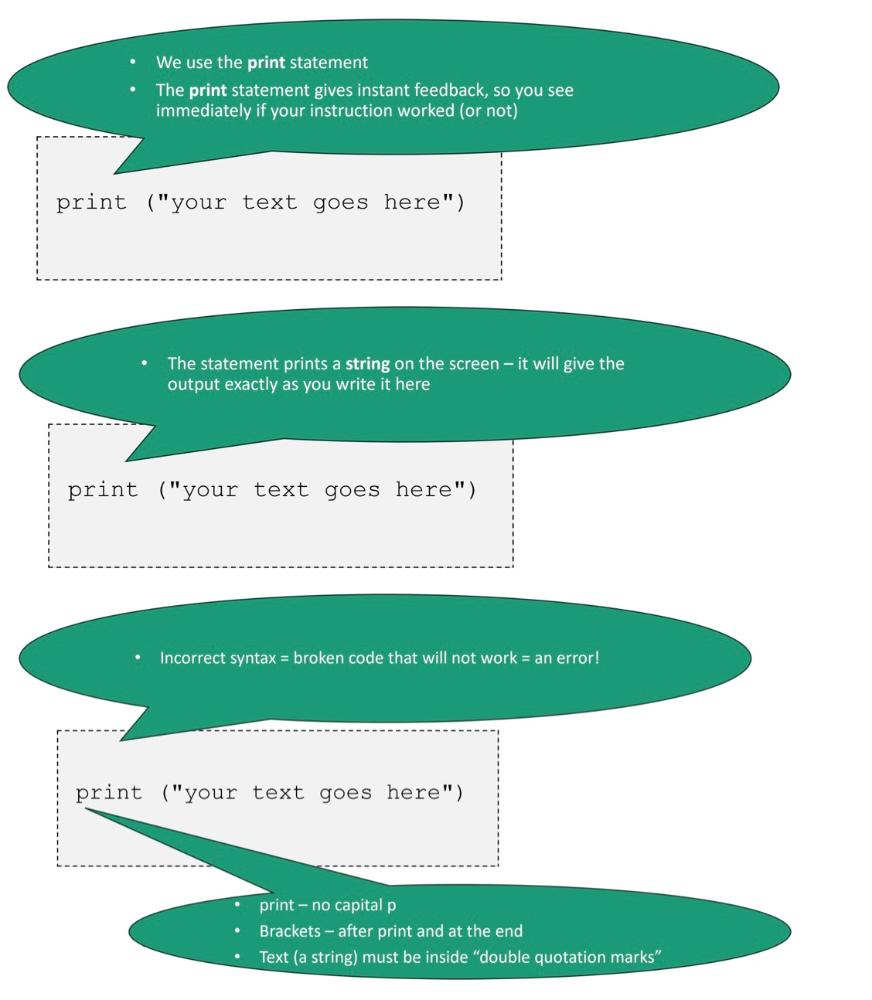
  • The print() function in Python is used to display output on the screen.
  • Example:
print("Hello, World!")

Adding Pseudo-code

  • Pseudo-code consists of comments that describe what the code does.
  • In Python, comments start with # and are ignored by the interpreter.
  • Helps make complex code more understandable.


Operands, Operators, and Operations


Basic Arithmetic Operations

  • Operators: Used to perform operations on values (operands).
  • Common mathematical operators in programming:
  • + Addition
  • - Subtraction
  • * Multiplication
  • / Division
  • % Modulo (remainder after division)
  • // Integer division (rounds down the result)

Order of Operations (Precedence)

  1. Parentheses (highest precedence) → (3+2) * 5
  2. Exponentiation → 2**3 (2 raised to the power of 3)
  3. Multiplication and Division → Evaluated before addition/subtraction
  4. Left-to-right evaluation when operators have the same precedence


5. Debugging: Fixing Errors and Bugs

Common Types of Errors in Programming

  • Syntax Errors: Mistakes in code structure (e.g., missing parentheses or colons).
  • Semantic Errors: Code runs but produces incorrect results due to logic mistakes.
  • Runtime Errors: Unexpected issues that cause the program to crash (e.g., division by zero).

Debugging Strategies

  • Carefully read error messages to locate the issue.
  • Use print statements to track variable values.
  • Write comments to document complex parts of the code.


Chapter 2: Computer Programs and Processing

Définition

What is a Computer Program?
A program is a sequence of instructions that tells a computer what to do to solve a problem. Programs can be used for different types of computations: Mathematical (e.g., calculating the square root of a number) Statistical (e.g., performing regression analysis) Symbolic (e.g., searching and replacing text in a document) Graphical (e.g., playing a video or processing an image). A program consists of input, output, processing, and optional conditional execution or repetition.

Sequences and Sequencing


A program consists of a sequence of instructions that tells the computer exactly what to do.

Sequencing refers to writing instructions in a structured and ordered manner.

Définition

What is a Sequence?
A sequence is a structured set of ordered steps that explicitly solve a problem. It reflects manual processes and business rules related to a specific problem domain. Sequences are not generalizable; they are specific to a task. Later, we can learn to abstract sequences into reusable algorithms.

Writing Code: Input, Output, and Processing


Input and Output

  • Input: Data received by the computer (from users, files, sensors, etc.).
  • Output: Data sent back by the program (displayed on screen, saved to a file, printed, etc.).
  • Inputs and outputs can be stored for later use.

Processing

  • Processing transforms input into output.
  • It includes basic mathematical and statistical operations (addition, subtraction, averages, percentages, etc.).

Writing Output to the Screen

  • The print() function in Python is used to display output on the screen.
  • Example:
print("Hello, World!")

Adding Pseudo-code

  • Pseudo-code consists of comments that describe what the code does.
  • In Python, comments start with # and are ignored by the interpreter.
  • Helps make complex code more understandable.


Operands, Operators, and Operations


Basic Arithmetic Operations

  • Operators: Used to perform operations on values (operands).
  • Common mathematical operators in programming:
  • + Addition
  • - Subtraction
  • * Multiplication
  • / Division
  • % Modulo (remainder after division)
  • // Integer division (rounds down the result)

Order of Operations (Precedence)

  1. Parentheses (highest precedence) → (3+2) * 5
  2. Exponentiation → 2**3 (2 raised to the power of 3)
  3. Multiplication and Division → Evaluated before addition/subtraction
  4. Left-to-right evaluation when operators have the same precedence


5. Debugging: Fixing Errors and Bugs

Common Types of Errors in Programming

  • Syntax Errors: Mistakes in code structure (e.g., missing parentheses or colons).
  • Semantic Errors: Code runs but produces incorrect results due to logic mistakes.
  • Runtime Errors: Unexpected issues that cause the program to crash (e.g., division by zero).

Debugging Strategies

  • Carefully read error messages to locate the issue.
  • Use print statements to track variable values.
  • Write comments to document complex parts of the code.